Introduction to the Dexcom Device Recall: What Patients Need to Know
Welcome to this authoritative guide on the Dexcom Device Recall. Dexcom continuous glucose monitoring (CGM) systems are widely used to support daily diabetes management. When a Dexcom device, component, or accessory is recalled, the announcement can feel urgent, confusing, and personal because CGM data often informs dosing decisions, alarms, and day-to-day safety.
This guide explains what a Dexcom recall means in practical terms, how to check whether your specific product is affected, what to do immediately to protect your health, and how to work with Dexcom and your clinician to reduce risk going forward.
If you or a loved one used a defective Dexcom device and suffered harm when your Dexcom device malfunctioned, contact Dexcom Recall Lawsuit Lawyer Timothy L. Miles for a free case evaluation today as you may be eligible for a Dexcom Device Recall Lawsuit and potentially be entitled to substantial compensation. (855) 846–6529 or [email protected].

What a “recall” actually means (and what it does not)
A medical device recall is an action taken to address a product problem that could cause harm or lead to incorrect clinical decisions. In the United States, recalls are typically coordinated with the U.S. Food and Drug Administration (FDA). In other countries, similar actions may be coordinated with national regulators.
A recall does not always mean:
- You must stop using your CGM immediately.
- Every Dexcom product is affected.
- You are in danger if you used the device in the past.
A recall usually means Dexcom (often in coordination with a regulator) is asking users to do one or more of the following:
- Confirm whether your lot or serial number is impacted.
- Follow updated instructions, labeling, or software guidance.
- Replace a component (sensor, transmitter, receiver) or update an app.
- Return or discard certain units.
The details matter because the recommended response depends on the specific defect or failure mode. For instance, if you find yourself dealing with a defective Dexcom device, it’s crucial to understand your rights and options. You might want to explore whether you qualify for a Dexcom lawsuit which could potentially provide compensation for any harm caused by the defective device. Additionally, staying updated on any Dexcom device recall lawsuit updates can provide valuable information during this challenging time.
Why Dexcom products get recalled
Recalls in CGM systems generally involve one of these categories:
1) Accuracy or data integrity concerns
If a CGM reports glucose values that are systematically too high, too low, delayed, or inconsistent, a patient may:
- Over treat a perceived low.
- Under treat a true high.
- Make insulin dosing decisions on inaccurate readings.
Dexcom CGM labeling typically instructs patients when to confirm with a fingerstick, especially if symptoms do not match readings or when readings appear implausible. A recall may expand or emphasize these circumstances. Such accuracy or data integrity concerns can significantly affect diabetes management, as highlighted in this study.
2) Alarm, alert, or notification failures
CGMs provide alerts for hypoglycemia and hyperglycemia. If a recall involves alarms that:
- Do not trigger when expected,
- Trigger late,
- Trigger repeatedly without cause, or
- Fail due to app or receiver issues,
then the main patient risk is missed or delayed treatment.
3) App, software, or connectivity issues
Modern Dexcom systems rely on a smartphone app and Bluetooth connectivity. A recall may involve:
- Compatibility issues after operating system updates.
- Data dropouts that affect trend visibility.
- Display or calculation problems.
- Pairing failures between sensor, transmitter, and phone/receiver.
Some recalls are addressed through software updates, revised compatibility guidance, or changes to recommended settings.
4) Component defects or packaging issues
Examples can include:
- Sensors that fail early.
- Adhesive or applicator issues.
- Transmitters that have reduced battery life.
- Packaging or labeling errors that lead to misuse.
In these cases, Dexcom may replace impacted lots and provide updated instructions.
How to find out if your Dexcom device is part of a recall
A recall is usually specific to:
- A model (such as a particular sensor, transmitter, receiver, or accessory),
- Specific lots or serial numbers,
- A production date range,
- A particular app version or software build.
To determine if you are affected, use a layered approach.
Step 1: Check official recall listings
Use official sources first, because social media summaries are often incomplete.
- FDA Medical Device Recalls database (United States): Search for “Dexcom” and your product name.
- Dexcom’s official notices: Dexcom may post field safety notices, customer notifications, or replacement instructions.
- Your country’s regulator: For example, MHRA (UK), Health Canada, TGA (Australia), and EU competent authority communications.
Step 2: Identify your exact product and configuration
Write down:
- Your CGM system type and model.
- The component you are using (sensor, transmitter, receiver, app).
- The phone model and operating system version (if using the Dexcom app).
- The app version.
Step 3: Collect lot, serial, and version information
Depending on your system, you may find identifiers on:
- Sensor box labels (lot number, expiration date).
- Transmitter packaging (serial number).
- Receiver label (serial number).
- App “About” screen (app version).
- Receiver settings menu (software version).
If the recall relates to a specific lot or serial range, this is the information Dexcom support will ask for.
Step 4: Confirm with Dexcom support (especially if unsure)
If you cannot confidently match your device to the recall notice, contact Dexcom support and provide:
- Your identifiers (lot/serial/version).
- A brief description of any symptoms: sensor failures, false alarms, signal loss, inaccurate readings, or app crashes.
- Your location and shipping address if replacements are involved.
What to do immediately if a recall may affect you
Patients often ask the same question first: “Do I stop using my Dexcom right now?”
The safest answer is structured:
1) Follow the recall notice instructions verbatim
If the recall says to stop using a certain lot, stop using it. If it says to update software, do that. If it instructs you to verify readings by fingerstick under certain conditions, do that.
Do not rely on a general rule when you have a product specific instruction.
2) Use symptom-based safety checks
Regardless of the recall category, apply this safety principle:
- If your symptoms do not match your CGM reading, confirm with a blood glucose meter.
Examples:
- CGM shows 65 mg/dL but you feel normal: confirm before treating aggressively.
- CGM shows 160 mg/dL but you feel hypoglycemic: confirm immediately.
- CGM trend looks wrong or changes abruptly without explanation: confirm.
If you or a loved one used a defective Dexcom device and suffered harm when your Dexcom device malfunctioned, contact Dexcom Recall Lawsuit Lawyer Timothy L. Miles for a free case evaluation today as you may be eligible for a Dexcom Device Recall Lawsuit and potentially be entitled to substantial compensation. (855) 846–6529 or [email protected].
3) Strengthen your backup plan for 7 to 14 days
During recall periods, it is prudent to assume you may experience interruptions.
Prepare:
- A working blood glucose meter.
- Sufficient test strips and lancets.
- Ketone testing supplies if recommended by your clinician.
- A written insulin plan for pump failure or sensor downtime, if applicable.
If you use insulin and are at risk for severe hypoglycemia, ensure that you have:
- Fast acting carbohydrates available.
- Glucagon (and that household members know where it is).
In such scenarios, it’s also important to consider the Diabetes Technology Standards of Care, which can provide valuable insights and guidelines on managing your diabetes technology effectively during recalls.
4) Consider alert settings and caregiver sharing
If alarms or connectivity are part of the recall, take practical steps:
- Verify your phone is not in silent modes that suppress alerts.
- Confirm notification permissions for the Dexcom app.
- Confirm Bluetooth is on and battery optimization is not restricting the app.
- Test sound and vibration settings.
- If you use data sharing, confirm followers are receiving alerts.
These actions do not “fix” a defective product, but they reduce the chance of a preventable missed alert.
5) Document failures as they happen
If you are seeking replacements or reporting an adverse event, clear documentation helps. Note:
- Date and time of issue.
- What the CGM displayed and what a fingerstick confirmed.
- Whether an alert triggered.
- Any screenshots from the app.
- Any error codes.
If you are using an insulin pump or automated insulin delivery (AID)
CGM recalls can feel more serious for patients on an AID system because CGM data may influence automated basal adjustments and correction doses (depending on your system configuration).
You should be especially cautious if:
- Your pump is acting on CGM readings (closed loop or hybrid closed loop).
- You notice a pattern of unexplained insulin delivery changes.
- You have frequent compression lows, signal loss, or improbable readings.
Practical steps that many clinicians recommend during CGM uncertainty include:
- Use fingerstick confirmation before correction boluses if readings seem off.
- Consider temporarily adjusting automation settings only under clinician guidance.
- Review pump and CGM logs for repeated error patterns.
- Keep rapid acting insulin delivery options and a plan for manual mode.
Because AID systems vary by manufacturer and software version, you should coordinate changes with your diabetes care team rather than improvising.
What “Class I, II, or III” recall means for patients
In the U.S., the FDA assigns a recall classification based on the potential health risk:
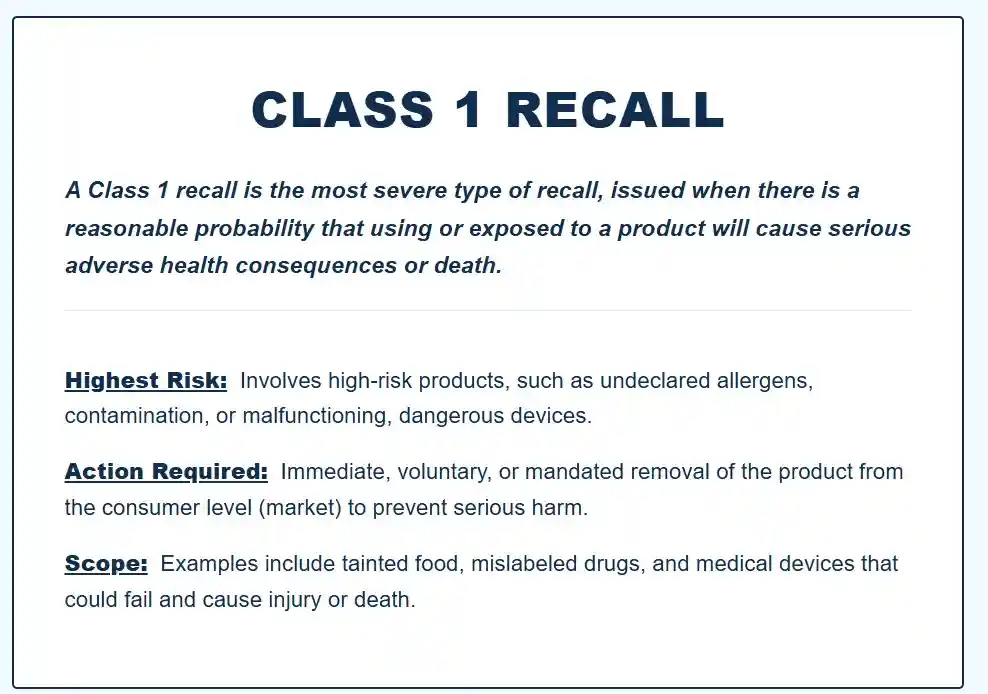
- Class I: Reasonable probability that use could cause serious adverse health consequences or death.
- Class II: Use may cause temporary or medically reversible adverse health consequences, or the probability of serious consequences is remote.
- Class III: Use is not likely to cause adverse health consequences, but violates labeling or manufacturing rules.
This classification does not tell you what to do day to day. The action steps still come from the recall notice, but classification can help you calibrate urgency and follow-up.
If you see a Class I recall and you use insulin, treat it as time sensitive, confirm readings more frequently, and contact Dexcom promptly for instructions and replacement pathways.
Replacement, refunds, and what to expect from Dexcom
In many recall scenarios, Dexcom may:
- Replace affected sensors, transmitters, or receivers.
- Provide updated instructions or training.
- Provide a software patch, app update, or compatibility guidance.
To speed the process:
- Keep the original box until you confirm you are not affected.
- Save your lot numbers and serial numbers.
- Take photos of packaging identifiers.
- Ask Dexcom whether they need the affected item returned.
If you obtain supplies via a distributor, pharmacy, or durable medical equipment provider, you may have two parallel workflows:
- Dexcom for technical triage and authorization of replacements.
- The supplier for shipping, billing adjustments, and documentation.
Be prepared to confirm your prescribing clinician and your supply channel.
If you or a loved one used a defective Dexcom device and suffered harm when your Dexcom device malfunctioned, contact Dexcom Recall Lawsuit Lawyer Timothy L. Miles for a free case evaluation today as you may be eligible for a Dexcom Device Recall Lawsuit and potentially be entitled to substantial compensation. (855) 846–6529 or [email protected].
How to report a problem (and why it matters)
Reporting matters because it improves detection, classification, and corrective action. It also creates a traceable record if you experienced harm.
Report to Dexcom
If you believe your device malfunctioned, report it through Dexcom support channels with:
- Product identifiers,
- Description of the issue,
- Whether you confirmed with a meter,
- Any clinical outcome (hypoglycemia, hyperglycemia, ER visit).
Report to your regulator
In the U.S., patients and clinicians can report to FDA MedWatch. Other countries have similar reporting programs.
A practical guideline: if the issue caused a serious event, a near miss, or repeated malfunction, reporting is appropriate.
Common patient questions during a Dexcom recall
“Should I rely on fingersticks instead?”
If the recall involves accuracy, alarms, or data integrity, fingerstick confirmation becomes more important, especially:
- Before dosing insulin when readings are unexpected.
- When you have symptoms that conflict with the CGM.
- When trend behavior is erratic.
That said, do not abandon CGM entirely unless instructed. Many recalls involve a subset of lots or a specific configuration, and CGM can still provide useful trend information when used with appropriate verification.
“Can I keep using my sensors until replacements arrive?”
Only if the recall notice allows continued use. Some notices instruct continued use with modified precautions; others instruct immediate discontinuation for affected lots.
When in doubt, contact Dexcom and your clinician, and increase verification checks until you receive formal guidance.
“What if I already used an affected lot?”
Using an affected lot does not automatically mean harm occurred. The key question is whether you experienced inaccurate readings, missed alerts, or clinical events. If you had symptoms, adverse outcomes, or repeated anomalies, document and report them.
“Will insurance cover replacements?”
Coverage pathways differ, but replacement due to recall is commonly handled through the manufacturer’s corrective action process rather than standard insurance refills. Your supplier may still need documentation, but Dexcom typically provides the operational path.
“Is my phone the problem?”
Sometimes, yes. If the recall or safety notice relates to app compatibility, operating system changes, or Bluetooth performance, the “device” can be the system as a whole. Confirm:
- Your phone model is listed as compatible.
- Your OS version is supported.
- Your app is updated to the recommended version.
Also ensure that system settings are not restricting background activity or notifications.
Risk reduction: how to protect yourself beyond this recall
The most forward looking approach is to assume that complex connected devices will occasionally fail and to build resilience into your routine. Strong device performance is important, but strong personal safeguards are essential.
1) Treat CGM as a decision support tool, not an infallible source
CGM is powerful because it shows direction and rate of change. It can still be wrong in specific contexts such as compression lows, sensor warm up periods, dehydration, or rapidly changing glucose. A recall simply increases the probability that a known failure mode may occur.
Repeat the core rule:
- When in doubt, verify with a blood glucose meter.
2) Maintain a standardized “CGM downtime” kit
Include:
- Meter, strips, lancets.
- Spare batteries or charging cables.
- Written basal and bolus plan (or a printed pump failure plan).
- Ketone test supplies if you are at risk of DKA.
- Contact information for Dexcom support and your supplier.
3) Review your alert strategy quarterly
At minimum:
- Confirm low alert thresholds align with your clinician’s guidance.
- Ensure urgent low alerts are not muted.
- Check that follower and caregiver alerts are active if you rely on them.
- Reconfirm notification permissions after phone updates.
4) Keep your software disciplined
Connected health devices fail most often at the intersections: phone OS updates, app updates, Bluetooth stacks, and background permissions.
A pragmatic method:
- Avoid updating your phone OS on day one if you rely on CGM and compatibility is uncertain.
- Update the Dexcom app promptly when Dexcom recommends it for safety reasons.
- After any update, test alerts and confirm data continuity for at least one full day.
5) Engage your care team proactively
If a recall affects your confidence in CGM readings, that uncertainty can lead to overly conservative dosing, glucose variability, and burnout.
Bring specific data to your clinician:
- Dates of sensor failures.
- Times of missed alerts.
- Meter comparisons.
- Any severe events or near misses.
With that information, your team can help you decide whether you should change settings, change wear location technique, or temporarily increase fingerstick checks.
A practical checklist for patients (printable)
Use this checklist if you suspect your Dexcom device may be affected by a recall.
- Identify your Dexcom product and component (sensor/transmitter/receiver/app).
- Find lot numbers, serial numbers, expiration dates, and app version.
- Check official recall notices and confirm whether your identifiers match.
- Follow the recall instructions exactly.
- Increase fingerstick verification when symptoms disagree or readings appear abnormal.
- Ensure alerts are functioning and notification permissions are enabled.
- Prepare a CGM downtime kit for at least 7 to 14 days.
- Contact Dexcom for replacement steps if your device is affected.
- Inform your clinician if you experienced inaccurate readings, missed alerts, or clinical events.
- Report serious malfunctions or harm to your regulator (for example, FDA MedWatch in the U.S.).
The bottom line
A Dexcom recall is a signal to act with precision, not panic. Confirm whether your specific lot, serial number, or software version is affected. Follow the manufacturer’s instructions exactly. Increase verification when readings seem wrong or symptoms do not match. Maintain a reliable backup plan, because continuity is safety.
Most importantly, treat the recall as an opportunity to strengthen your system: clearer alert practices, better documentation, disciplined software updates, and a proactive relationship with your care team. Robust habits reduce risk today and build resilience for the future.
If you or a loved one used a defective Dexcom device and suffered harm when your Dexcom device malfunctioned, contact Dexcom Recall Lawsuit Lawyer Timothy L. Miles for a free case evaluation today as you may be eligible for a Dexcom Device Recall Lawsuit and potentially be entitled to substantial compensation. (855) 846–6529 or [email protected].
Frequently Asked Questions about the Dexcom Device Recall
What does a Dexcom medical device recall mean for users?
A Dexcom medical device recall is an action taken to address a product problem that could cause harm or lead to incorrect clinical decisions. It does not always mean you must stop using your CGM immediately, nor that every Dexcom product is affected. Typically, it involves confirming if your device is impacted, following updated instructions, replacing components, or returning certain units.
Why are Dexcom continuous glucose monitoring systems recalled?
Dexcom CGM recalls usually involve issues such as accuracy or data integrity concerns, alarm or alert failures, app or software connectivity problems, and component defects or packaging issues. These problems can affect glucose readings, alarms for hypoglycemia/hyperglycemia, data transmission, or device functionality.
How can I check if my specific Dexcom device is part of a recall?
To determine if your Dexcom product is affected by a recall, start by checking official sources like the FDA Medical Device Recalls database and Dexcom’s official notices. Then identify your exact product model, component type, phone model and OS version (if using the app), app version, and collect lot numbers or serial numbers from packaging or device labels.
What should I do immediately if my Dexcom device is recalled?
If your Dexcom device is recalled, follow the specific instructions provided in the recall notice. This may include confirming your lot or serial number’s impact status, updating software or apps, replacing faulty components like sensors or transmitters, and consulting with your healthcare provider to adjust diabetes management safely.
Do I need to stop using my Dexcom CGM if there is a recall?
Not necessarily. A recall does not always require immediate cessation of use. The recommended response depends on the nature of the defect. Some recalls may only require software updates or increased fingerstick confirmations while others might necessitate replacement of parts. Always follow official guidance and consult your clinician before making changes.
How do Dexcom recalls affect diabetes management and safety?
Dexcom recalls can impact diabetes management by causing inaccurate glucose readings, missed or delayed alarms for hypo- or hyperglycemia, connectivity issues affecting data visibility, or component failures. Such issues may lead to incorrect dosing decisions and increased risk. It’s important to stay informed about recalls and work closely with healthcare providers to mitigate risks.