Introduction to the Dexcom Device Recall Update
Welcome to this authoritative Dexcom Device Recall Update. As of June 2025, the U.S. Food and Drug Administration (FDA) classified a Dexcom recall for G6, G7, ONE, and ONE+ receivers (Class I, the most serious type) due to a speaker malfunction preventing audio alerts for high/low glucose levels. Affected users should check their serial numbers at dexcom.com/checkreceiver and contact technical support at 1-844-478-1600 for a replacement.
Key Recall & Correction Detail Update (April, 2025)
- Affected Devices: Specific Dexcom G6, G7, ONE, and ONE+ receivers, largely covering incidents where audio alarms may fail.
- Major Issue: Receiver speakers may not sound when blood sugar is dangerously low or high.
- Action Needed: Verify your device serial number on Dexcom’s website.
- Alternative: The recall generally does not affect users solely utilizing the Dexcom mobile app instead of the dedicated receiver.
- App Corrections: A separate, mandatory update was issued for the G6 Android App (v1.15.0) and other apps to prevent potential failures to alert users of sensor issues.
Recommendation: If your receiver is affected, stop using it if possible and use the mobile app or a backup blood glucose meter until a replacement arrives.
Dexcom Device Recall Lawsuit Update (April, 2026)
As of April 2026, Dexcom faces multiple class-action lawsuits and Class I recalls (the most serious type) over faulty alerts and, in some cases, alleged wrongful deaths related to G6 and G7 CGM systems. Dupixent Cancer Lawsuits highlight missed hyperglycemic/hypoglycemic alerts leading to injuries, along with allegations of unauthorized design changes and faulty components causing premature sensor failure.

Key Updates on Dexcom Lawsuits and Recalls
- Class I Recalls (2025-2026): Multiple Class I recalls were initiated for G6 and G7 receivers due to faulty speakers, which can fail to sound, causing dangerous missed blood sugar alerts. Over 36,000 G6 and 600,000 G7 units were affected.
- Wrongful Death & Injury Lawsuits: Lawsuits, including wrongful death claims, allege that faulty G6 software led to fatal, undetected, severe hyperglycemic episodes.
- G7 Misleading Claims Lawsuit: A class-action lawsuit filed in late 2025 alleges that Dexcom misrepresented the accuracy and reliability of its G7 system, which was found to have “adulterated” materials and frequent early failures.
- Investor Lawsuits: A class action exists for investors who claim Dexcom hid safety issues and made material misstatements about the functionality of the G6 and G7, particularly between July 2024 and September 2025.
- FDA Warning Letters: In March 2025, the FD) issued a warning letter regarding “adulterated” G7 devices.
What Affected Users Should Do
- Check if your device is affected using the Dexcom G6 Receiver Serial Number.
- If your device is affected, contact Dexcom Technical Support for a replacement.
- Test your CGM receiver speaker regularly upon charging.
- Consult a legal professional if you or a family member suffered injuries due to a missed alert or, as this class action update note suggests, if a device failure led to hospitalization.
Understanding What a “Recall” Means in Medical Devices
A recall is a corrective action initiated to address a product issue that could compromise safety, performance, labeling, or regulatory compliance. In the realm of medical devices, recalls are usually classified by risk and managed under regulatory oversight.
Key recall terms you may encounter
- Correction: A fix applied to devices already distributed, such as a software update, revised instructions, or a replacement part.
- Removal: Pulling the product from use or distribution channels.
- Field Safety Notice (FSN) or Urgent Medical Device Correction: Common terminology used internationally to communicate necessary actions for users.
FDA recall classification (US)
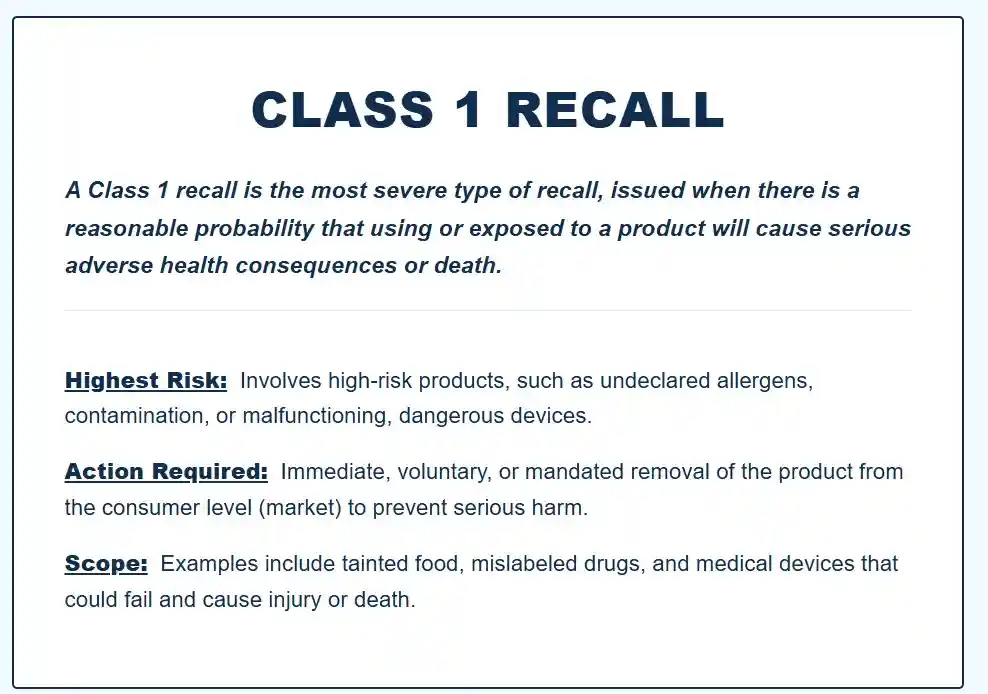
- Class I: Indicates reasonable probability of serious adverse health consequences or death.
- Class II: Suggests temporary or medically reversible adverse health consequences are possible.
- Class III: Unlikely to cause adverse health consequences but violates regulations or labeling requirements.
Though a recall does not always necessitate immediate cessation of device usage, it is crucial to regard any recall communication as time-sensitive until you confirm your specific product status and the advised course of action.
In some instances, legal action may be required due to the implications of the recall. If you believe you have suffered damages due to a defective Dexcom device during a recall period, you may be entitled to compensation as part of a class-action lawsuit.
If you or a loved one used a defective Dexcom device and suffered harm when your Dexcom device malfunctioned, contact Dexcom Recall Lawsuit Lawyer Timothy L. Miles for a free case evaluation today as you may be eligible for a Dexcom Device Recall Lawsuit and potentially be entitled to substantial compensation. (855) 846–6529 or tmiles@timmileslaw.com.
Confirm the Recall Is Real and Identify the Source
Because health-related scams exist, it is crucial to validate the notice before taking any action.
Trusted sources to check
- Dexcom official communications: email, app notifications, and the official Dexcom’s official recall page, or the FDA recall database.
- Your supplier: pharmacy, durable medical equipment provider, clinic, or hospital procurement team.
Regulatory databases by region
- United States: FDA Medical Device Recall database.
- United Kingdom: MHRA website.
- Canada: Health Canada website.
- Australia: TGA website.
- European Union: relevant national competent authority websites.
Red flags for fraudulent recall messages
- Requests for full payment card details, bank transfers, or unusual “verification fees.”
- Links to non-Dexcom domains that imitate branding.
- Pressure tactics that discourage you from verifying with Dexcom or a regulator.
If unsure, do not click links. Navigate to Dexcom through a browser you open yourself, or call Dexcom customer support using numbers listed on the official Dexcom site.
Locate Lot Numbers, Serial Numbers, and Software Versions
Recall actions are typically tied to traceability identifiers. You should assume that your recollection is not sufficient and verify using the physical packaging or device menus.
Where to find identifiers (typical locations)
- Outer box label: lot number, expiration date, and product codes.
- Individual pouch label: lot number and expiration date for sensors.
- Receiver: serial number in device settings or on the back label.
- Transmitter: serial number printed on the transmitter or in the app’s transmitter settings.
- Mobile app: app version in the app’s “About” or settings section.
If you no longer have the packaging, check whether your supplier can provide lot information from dispensing records. Clinics and pharmacies often retain traceability data.
Once you have the recall notice (or database entry), carefully match the stated criteria to your device identifiers. Recall notices usually specify one or more of the following:
- Affected lot number ranges
- Affected serial number ranges
- Affected manufacturing dates
- Affected expiration dates
- Affected software/app versions
- Affected distribution regions
Best practice for accuracy
Use a two-person verification method when possible, especially in households managing pediatric diabetes or in clinical environments. One person reads the label, the other compares it to the recall criteria. This reduces the risk of transcription errors.
If your product is outside the criteria, keep a copy of the notice for your records but do not take unnecessary actions such as stopping therapy or discarding supplies.
Follow the Immediate Safety Actions Recommended in the Notice
Recall communications often contain a “what to do now” section. Follow it precisely.
Common immediate actions for CGM-related issues
- Do not rely solely on CGM readings for dosing decisions if accuracy is compromised.
- Use fingerstick blood glucose checks (SMBG) for confirmation when symptoms do not match readings.
- Enable alerts and ensure thresholds are set appropriately.
- Replace a component (sensor, transmitter, receiver) if instructed.
- Update the app or device firmware if a software correction is provided.
- Stop using specific lots if directed.
A practical safety checklist (conservative and widely applicable)
- Confirm you have an alternative method to measure glucose (meter and test strips).
- Confirm you have an insulin delivery fallback plan if you use automation (for example, manual dosing guidance provided by your clinician).
- If you use a connected system (pump integrations), confirm that connectivity and data integrity are functioning as expected.
- Monitor for patterns: repeated sensor errors, signal loss, compression lows, or unusual lag.
If the notice instructs discontinuation, do not delay. If discontinuation may create clinical risk due to lack of alternatives, contact your clinician urgently for a transition plan.
Contact Dexcom Support and Request the Correct Remedy
Once you confirm you may be affected, contact Dexcom through official support channels. The remedy may include replacement components, updated instructions, return shipping labels, or a software update.
What to have ready on the call or support ticket
- Lot number and serial number
- Your shipping address and preferred contact method
- Photos of packaging labels (if requested)
- Description of the issue, including dates and frequency
- Any screenshots or error codes displayed in the app or receiver
What to ask for, clearly and professionally
- Confirmation that your specific identifiers are affected
- The precise corrective action and timelines
- Replacement quantities (for example, “How many sensors will be replaced?”)
- Whether you should return the affected product
- Documentation that confirms the recall remedy for your records
Maintain written records. If you call, note the date, time, agent name, and case reference number.
Notify Your Clinician if the Recall Affects Therapy Decisions
A recall can have clinical implications even when no physical harm has occurred. If the recall relates to inaccurate readings, missed alerts, or data gaps, involve the clinician who supports your diabetes management.
Situations where clinician involvement is especially important
- You have hypoglycemia unawareness or frequent severe lows
- You are pregnant or managing gestational diabetes
- You manage pediatric diabetes
- You use insulin pump automation based on CGM values
- You have recently changed insulin sensitivity factors or basal settings
- You have experienced unexplained highs or lows concurrent with device anomalies
The objective is proactive: reduce the probability of adverse events while a replacement or correction is implemented.
Document Any Incident, Symptom, or Adverse Event
Robust documentation protects you clinically and supports broader safety oversight.
What to document
- Date and time of the event
- CGM readings and trend arrows
- Confirmatory fingerstick results (if available)
- Symptoms experienced (for example, shaking, confusion, headache)
- Actions taken (carbohydrate intake, insulin correction, sensor change)
- Device messages, alerts, and error codes
- Photos of relevant labels and screen messages
Why documentation matters
- It supports correct triage by Dexcom support.
- It assists clinicians in adjusting management temporarily.
- It strengthens regulator reporting, which improves systemic safety.
As outlined in this NIH report, effective documentation is not just a formality; it plays a crucial role in patient safety and care continuity.
If you or a loved one used a defective Dexcom device and suffered harm when your Dexcom device malfunctioned, contact Dexcom Recall Lawsuit Lawyer Timothy L. Miles for a free case evaluation today as you may be eligible for a Dexcom Device Recall Lawsuit and potentially be entitled to substantial compensation. (855) 846–6529 or tmiles@timmileslaw.com.